When Will Your AI Bill Cross Your Budget? The Run-Rate Arithmetic
Two lines of arithmetic tell you mid-month which day your AI spend will pass your budget, and the day a provider spend limit will stop your requests. Here's how to pick the daily rate.
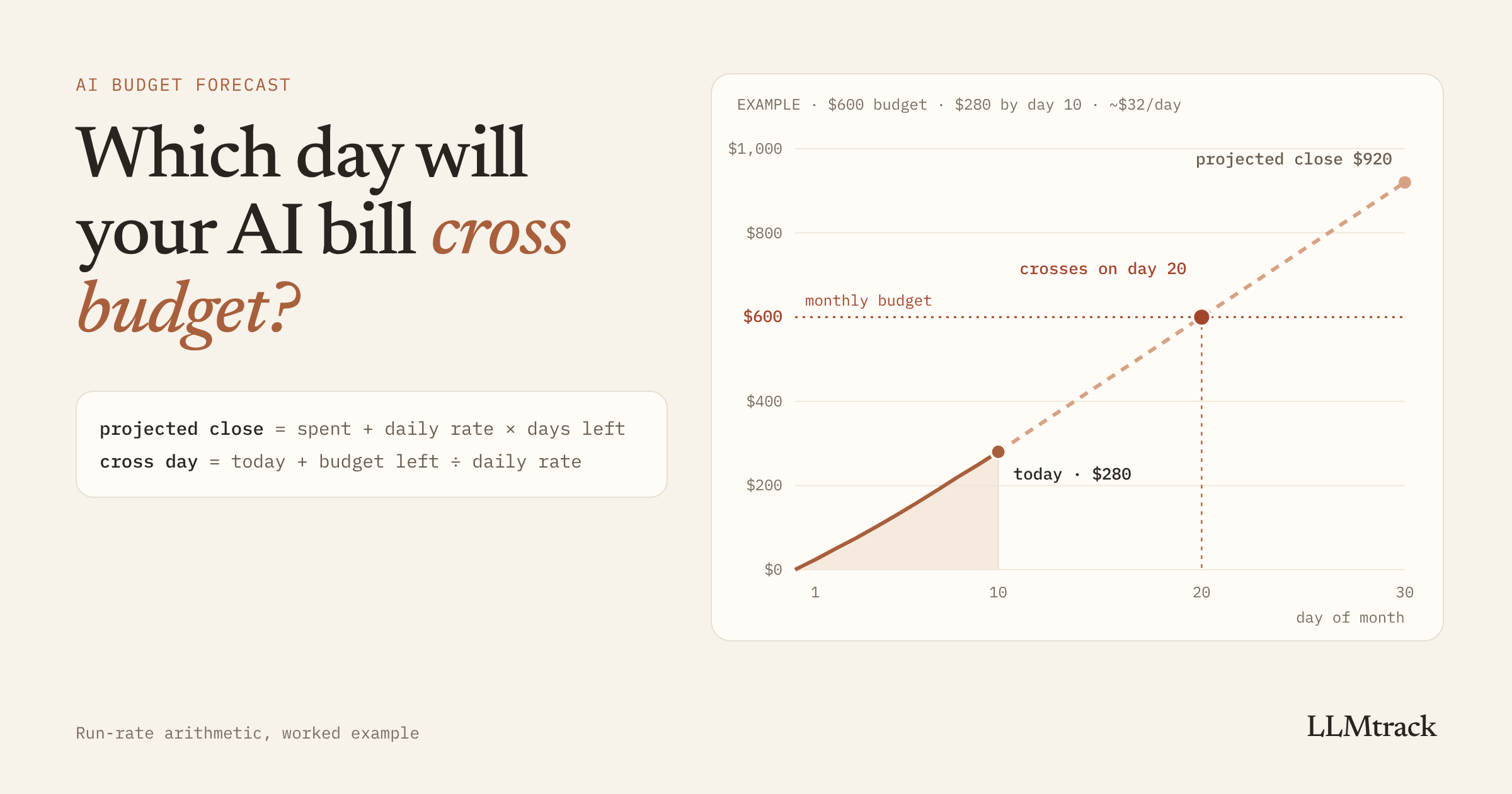
If you have a monthly budget for AI spend, you can work out today which day you'll cross it. You don't need a model or a data team. You need three numbers: what you've spent so far this month, what you're spending per day right now, and the number of days left.
Most teams find out from the invoice instead. By the time it lands, a spike has usually been running for weeks, and whatever caused it is still running. With AI APIs there's a second risk: if you've set a hard spend limit with your provider, crossing it doesn't just cost money. Your requests start failing.
Forecasting belongs to the "Prevent" part of the complete guide to LLM cost optimization. This post is the mid-month version: the quick arithmetic you can do on any day with numbers you already have.
The arithmetic
A small confession first: "run rate" is a phrase I used confidently for a while before I could have defined it. It's what you spend per day right now, carried forward. Once I knew that, forecasting stopped sounding like something I needed a finance degree for.
Here's an example with round numbers. Your budget is $600 for a 30-day month. It's the end of day 10 and you've spent $280. Over recent days you've averaged about $32 a day.
Projected close: $280 + ($32 × 20 days left) = $920.
Day you cross the budget: you have $320 of budget left. At $32 a day, that lasts 10 days, so you cross on day 20.
Laid out by day, the same forecast looks like this:
| Day | Spent so far | What happens |
|---|---|---|
| 10 | $280 | today |
| 17 | $504 | passes a $500 spend cap, if your provider has one set |
| 20 | $600 | passes your $600 budget |
| 30 | $920 | projected close, $320 over budget |
That's the whole method. A spreadsheet can do it, and so can a script that runs every morning.
Picking the daily rate
The daily rate decides everything, so it's worth picking with care. Here's the same month with a different shape. You've still spent $280 by day 10, but most of it came late: about $23 a day for the first seven days, then $40 a day for the last three.
| Daily rate used | Rate | Crosses $600 on | Projected close |
|---|---|---|---|
| Month-to-date average | $28/day | day 22 | $840 |
| Last 3 days | $40/day | day 18 | $1,080 |
The two forecasts are four days and $240 apart, from the same month-to-date total. If the jump is real, the month average is telling you a comfortable story that isn't true.
A few rules that hold up well:
- Use complete days. Today's partial spend drags the rate down. Forecast from yesterday backwards.
- Default to the last 7 days. A week covers one weekday and weekend cycle, so a quiet Saturday doesn't fool you. Most B2B products spend less at weekends, and a 3-day window that lands on one will read low.
- Switch to a shorter window after a step change. A feature launch, a big customer starting, or a prompt edit that broke your cache can move the rate overnight. When that happens, the days before it are history. Forecast from the days after.
- Recalculate daily. A forecast from Monday is stale by Thursday if the rate moved on Tuesday.
If your spend grows steadily week over week, a flat rate will understate the end of the month. For that case, fitting a trend line over a longer window works better, and how to know next month's AI bill today walks through it.
The date that matters more than your budget
Your own budget is a number in a spreadsheet. Provider spend limits are enforced, and they behave differently from what many people expect.
OpenAI lets you set spend limits for the whole organization or per project. Spend alerts only notify you and don't cap anything. Hard spend limits do stop traffic: once tracked spend reaches the limit, affected requests return HTTP 429 with the error code organization_spend_limit_exceeded or project_spend_limit_exceeded. OpenAI's docs also note that enforcement isn't instant, so recorded spend can slightly exceed the limit. Traffic resumes when you raise the limit or at the next monthly cycle.
Anthropic gives every organization on the Start, Build and Scale tiers a monthly spend cap: $500, $1,000 and $200,000 per calendar month. When you reach it, API usage pauses until 00:00 UTC on the first day of the next month unless you get a higher limit sooner. Requests return HTTP 429 with the error type rate_limit_error, the same type as a rate limit, but with no retry-after header, so automatic retries keep failing. The error_code field reads enforced_spend_limit_reached. You can also set your own lower limit, per organization or per workspace, and requests over it return HTTP 400 instead.
Go back to the first example. If that spend sat on an Anthropic organization with a $500 cap, the forecast says your product stops calling the API on day 17, three days before you'd cross your own budget. If your error handling treats that 429 as a rate limit, your retries will make the logs noisier and won't fix anything.
So run the arithmetic twice: once against your budget, and once against every hard limit in your provider accounts. The earlier date is the one to plan around. Check the limits you actually have set in each provider's console, because defaults vary by tier and change over time.
Doing it in code
If your requests are stored with a computed cost, one query gives you daily totals for the current month:
select date_trunc('day', created_at) as day,
sum(cost_usd) as usd
from llm_requests
where created_at >= date_trunc('month', now())
and created_at < date_trunc('day', now())
group by day
order by day;The created_at < date_trunc('day', now()) line leaves out today's partial day. Then the forecast is a few lines:
// dailySpend: complete days of the current month, oldest first,
// e.g. [{ day: 1, usd: 24.1 }, { day: 2, usd: 26.4 }, ...]
function forecastMonth(dailySpend, budget, daysInMonth, window = 7) {
if (dailySpend.length === 0) return null;
const today = dailySpend.length;
const spent = dailySpend.reduce((sum, d) => sum + d.usd, 0);
const recent = dailySpend.slice(-window);
const rate = recent.reduce((sum, d) => sum + d.usd, 0) / recent.length;
const projectedClose = spent + rate * (daysInMonth - today);
const crossDay = spent >= budget
? today
: today + Math.ceil((budget - spent) / rate);
return {
spent,
rate,
projectedClose,
crossDay: crossDay <= daysInMonth ? crossDay : null, // null: you don't cross this month
};
}Call it once with your budget and once with each provider limit. With the first example's numbers, $280 spent over 10 days at $32 a day, it returns a projected close of $920 and a cross day of 20 for a $600 budget.
What moves a forecast
When the cross day jumps earlier, the cause is usually one of a handful of things:
- A cache that stopped hitting. One edit near the top of a prompt can turn cheap cached reads into full-price input overnight. How prompt caching works, and how to keep it working covers the layout that avoids it.
- One heavy customer. A single account, often one with a script or an agent on their side, can grow faster than everyone else. Measuring AI cost per customer shows how to find it.
- Audio or images priced as text. Voice and image features bill at their own rates, which can be several times the text rate. See how image and audio models are actually billed.
- Loops and retries. An agent without a stopping condition or retry logic that multiplies requests can change the rate within hours. How one bad agent loop can cost $200 in an hour has the guardrails.
- Requests recorded at $0. If your cost table can't price a model and writes zero instead of leaving the cost empty, your forecast comes out too low, and nothing tells you.
A forecast tells you that you'll cross. A breakdown by feature and customer tells you why. Check where the extra spend comes from before you decide what to do about it.
What to do when the forecast says you'll cross
- Find the feature driving the increase. Compare each feature's daily cost over the last 7 days with the 7 before.
- Find out what kind of increase it is. One customer, a broken cache, a loop, or a model that costs more than the work needs. Each has a different fix: talk to the customer, fix the prompt layout, add a stopping condition, or test a cheaper model on a slice of traffic.
- Decide about hard limits before the day arrives. If a provider cap will hit before your fixes land, raise it on purpose or accept the outage on purpose. Don't let it surprise you on day 17.
- If none of the above applies, it may simply be growth. Then the budget is what needs changing, and the forecast gives you the number to change it to.
For turning the forecast into alerts that fire on their own, the cost alerts and budget limits setup guide covers what to alert on.
Where LLMtrack fits, and its limits
LLMtrack's Forecast does this arithmetic from your actual daily run rate, as each request lands, and names the feature behind the spend. On the demo workspace I use for product screenshots, so not a real customer's bill, it shows $824.76 spent so far this month, a projected close of $1,012, a $600 budget passed on day 22, and docs-search as the cause at 94% of the spend. The forecast is on the free plan. Email alerts are on Pro.
There are two limits. A forecast follows the run rate, so it can't know about a launch you're planning next week. And LLMtrack can tell you the day you'll cross, but it can't stop the spending. It records each request after the response comes back and never sits between your app and the provider, so it has no way to block a call. If you need a hard stop, the provider's own spend limit is the tool for that, and the forecast tells you when it will trigger.
To see the forecast for your own traffic, start on the free plan, no card needed. To estimate a new feature's daily cost before it ships, use the LLM cost calculator.
FAQ
Add up what you've spent so far this month, work out your average daily spend over the last 7 complete days, multiply it by the days left in the month and add it to what you've spent. Recalculate every day, because the daily rate can change overnight.
It's what you're spending per day right now, carried forward. If you spent $224 over the last 7 days, your run rate is $32 a day, and at that rate the next 20 days will cost about $640.
Subtract what you've spent from your budget, divide the remainder by your daily rate, and add the result to today's day of the month. With $320 of budget left at $32 a day on day 10, you cross on day 20.
With an OpenAI hard spend limit, affected requests return HTTP 429 with a project_spend_limit_exceeded or organization_spend_limit_exceeded error until you raise the limit or the next monthly cycle starts. When an Anthropic organization reaches its tier's monthly cap, requests return HTTP 429 with enforced_spend_limit_reached until 00:00 UTC on the first of the next month, unless the limit is raised. A lower limit you set yourself on Anthropic returns HTTP 400.
Recent days. The last 7 complete days cover one weekday and weekend cycle. After a step change like a launch or a broken cache, use only the days since the change. The month-to-date average lags behind any change and usually makes the forecast too optimistic.
It's accurate when spend is steady and gets less accurate when spend is growing or changing shape. Treat it as an early warning you recalculate daily. For steady growth over several weeks, a trend line over a longer window does better.
Sources
Checked on 31 Oct 2026:
See the day you'll cross your budget, for your own traffic
Free plan, no card. Forecast included.
Start tracking free →