Which Customer Is Costing You Money? AI Cost per Customer
Your average AI cost per customer hides the one account that loses you money. Here's how to measure cost per customer, read it, and fix it.
If you sell an AI product on a flat monthly plan, there's a decent chance one of your customers costs you more than they pay. You probably can't see which one. Your provider sends you a total per model, and your billing tool knows what each customer pays, but nothing puts the two side by side.
I started out with a smaller version of this question: which feature in my app was spending the money. Building a cost tracker pushed me to the bigger one. If you charge customers, the feature matters less than the account. This post is everything I've learned about answering it: how to measure AI cost per customer, how to read the numbers once you have them, and what to do about the account at the top of the list.
Measuring cost per customer is the step after measuring cost per feature, covered in the "Measure" part of the complete guide to LLM cost optimization.
Why the average lies
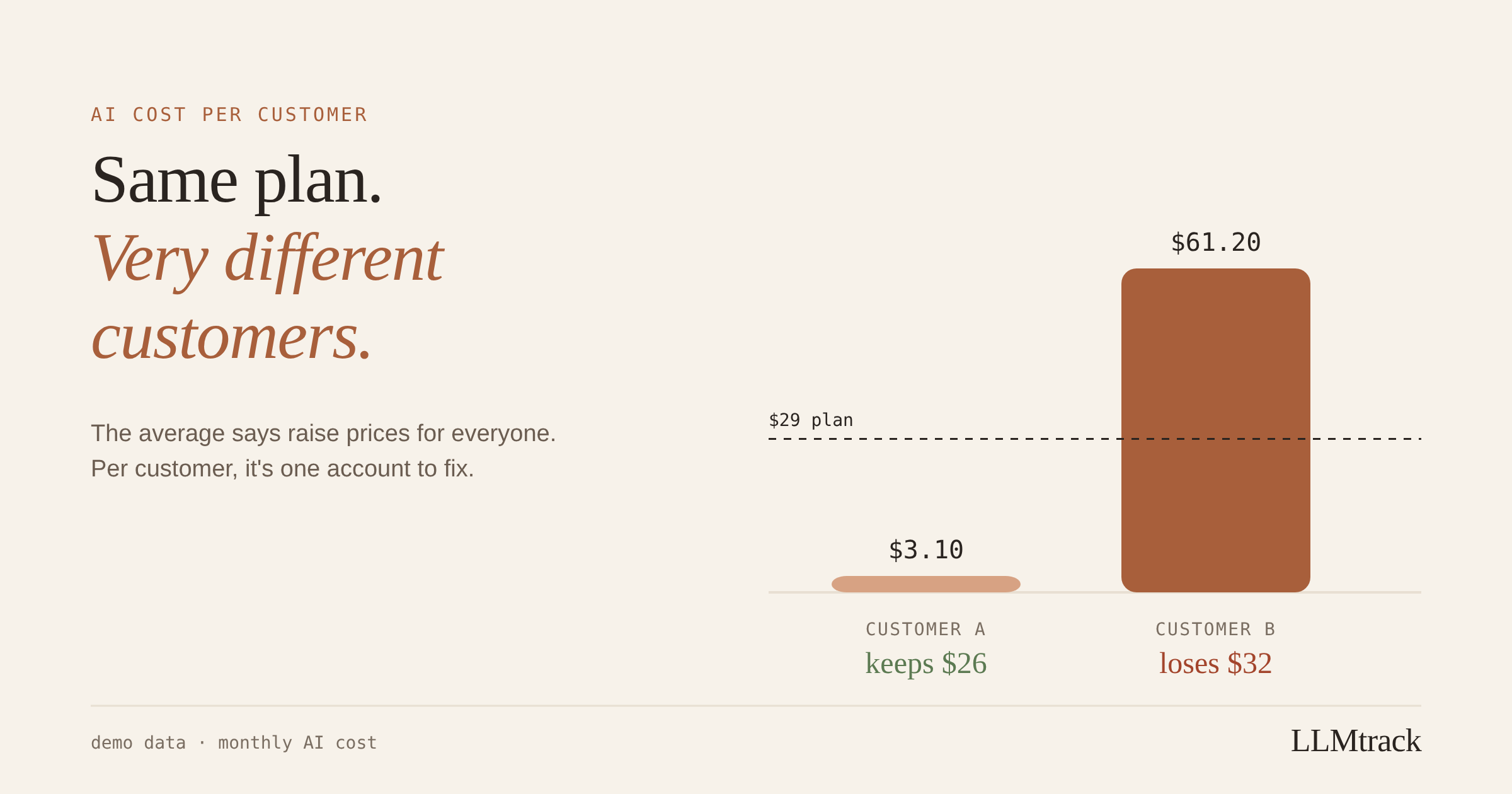
Here's a worked example from the demo workspace I use for product screenshots, so these aren't real customers. Two customers are on the same $29 plan. One costs $3.10 a month in AI calls. The other costs $61.20.
Average them and each customer costs $32.15, a bit more than the $29 they pay. If the average is all you can see, the answer looks obvious: every customer loses you about $3 a month, so raise the price for everyone.
Now look at them one at a time. The first customer pays $29 and costs $3.10, so you keep about $26. The second pays $29 and costs $61.20, so you lose about $32.
Your pricing works fine for the first customer. It fails badly for the second. Raising prices for everyone would punish the customer who was never the problem, and it might not even fix the one who is.
Why AI costs are so uneven
With most software, a heavy user costs you a bit more database and bandwidth. With an AI feature, every request is billed by the token, so a heavy user can cost many times what a light user does. A few things drive it:
- Long inputs. A customer who pastes whole documents sends far more tokens per request than one who asks short questions.
- Long conversations. Every turn of a chat re-sends the history before it, so a customer who keeps one conversation going all day gets more expensive with each message. More on that in how conversation history quietly inflates chat costs.
- Automation. A customer who connects your product to a script, an agent or a scheduled job can make thousands of requests a day without a human typing anything.
- Feature mix. A customer who lives in your most expensive feature (long reasoning, voice, image generation) costs more than one who uses the cheap ones.
So your costs rarely sit in a neat bell curve around the average. They usually form a long tail, and a handful of accounts at the end of it can decide whether your margins look healthy. That unevenness is a big part of why AI SaaS gross margins come in below classic SaaS.
How to measure AI cost per customer
You can do this yourself with your own database. It takes four steps.
1. Put a customer ID on every AI request. At the point in your code where you call the model, you almost always know which account the request is for. Log that ID together with the model name and the token counts from the response's usage object. Use your internal account ID or a hash of it. You don't need names or emails, and leaving them out keeps personal data out of your logs.
2. Price each request. Multiply each token type by the model's rate for that type. Input, output, cached input, cache writes, reasoning tokens and audio can all have different rates, so price them separately. A single blended rate will be wrong for any feature that uses caching, reasoning or voice. The LLM API pricing sheet lists the rates per model.
3. Add it up per customer per month. If your requests live in a table with a computed cost, it's one query:
select customer_id,
date_trunc('month', created_at) as month,
count(*) as requests,
sum(cost_usd) as ai_cost
from llm_requests
group by customer_id, month
order by month desc, ai_cost desc;4. Join it to what each customer pays. Use what they actually paid that month after discounts, and spread annual plans across twelve months. Then calculate one ratio per customer: AI cost divided by revenue. Under 1 means they pay for their AI usage. Above 1 means you're paying for it.
A few edge cases are worth deciding up front:
- Requests with no customer. Background jobs, internal tools and evaluation runs still cost money. Give them their own label, like
systemorinternal, so they don't vanish or get blamed on a customer. - Accounts versus users. For B2B products, attribute cost to the paying account, not to each person inside it. Otherwise five people at one company look like five small customers.
- Free and trial users. Their revenue is zero, so the ratio doesn't work. Track their total cost separately as an acquisition cost, and watch for trial accounts that behave like automation.
How to read the numbers
Once you have cost and revenue per customer, sort by AI cost, highest first, and look at the top five. For each one, check three things:
- The ratio. How much of what they pay goes on AI? Above 1 is a loss on that account before any of your other costs.
- The feature. Which feature drives their cost? One expensive feature is usually easier to fix than general heavy use.
- The trend. Is their cost steady, growing, or did it jump on a specific day? A sudden jump often means a script or an integration on their side, not a person.
Here's a made-up example of what that list can look like:
| Customer | Plan | AI cost this month | Cost ÷ revenue | Main feature |
|---|---|---|---|---|
| acct_7f2 | $29 | $61.20 | 2.11 | document chat |
| acct_c19 | $99 | $38.40 | 0.39 | summarizer |
| acct_a04 | $29 | $14.90 | 0.51 | document chat |
| acct_3be | $29 | $3.10 | 0.11 | summarizer |
| acct_e88 | $29 | $2.70 | 0.09 | search |
Only one account is a problem here. The $99 customer costs more in absolute terms than most, but they pay for it comfortably. Sorting by the ratio, not just by cost, is what separates the two.
What to do about the account at the top
Once you know who it is and why, you have options, roughly from cheapest to most effort:
- Talk to them. Heavy usage is sometimes a bug on their side, like a script calling your API in a loop. One email can fix it.
- Add a usage cap or a fair-use limit to the plan, so the worst case has a ceiling.
- Create a heavier tier and move accounts like this one to it. If they get real value, many will pay for it.
- Move their expensive feature to a cheaper model, if the quality holds for that feature. Test on a slice of real traffic first.
- Keep them on purpose. A loss-making account can still be worth it, for example as a reference customer or a design partner. The point is that it's a decision, not an accident.
Every one of these depends on knowing which customer it is. A total per model can't give you that.
Where LLMtrack fits, and its limit
This is the question LLMtrack was built to answer without the spreadsheet. You pass a customer ID with each tracked request, next to the feature name and token counts. LLMtrack prices each request at the model's rates as it lands, rolls cost up per customer, and shows it next to what that customer pays.
With the Node SDK, it's one extra field on the call you'd already make:
llmtrack.track({
provider: 'openai',
model: completion.model,
feature: 'document-chat',
customerId: 'acct_7f2',
...fromOpenAIUsage(completion.usage),
});The limit, stated plainly: margin is measured against the plan price you enter. If you sell one plan at one price, that's exact. With several plans, discounts, annual deals or custom pricing, it's an approximation, because LLMtrack doesn't store what each customer actually pays yet. That's the gap I most want to close. Until then, treat the margin column as a strong signal for single-plan products and a rough guide for anything more complicated.
To try it on your own traffic, start on the free plan, no card needed. To estimate a feature's cost per user before it ships, use the LLM cost calculator.
Related reading: the unit economics of AI features and tracing a bill spike back to the feature that caused it.
FAQ
Neither provider's invoice breaks cost down by your customers. You have to attach your own customer ID to each request in your code, store it with the token counts from the response, price each request at the model's rates, and add it up per customer.
Your internal account ID, or a hash of it. Avoid names and email addresses, so personal data stays out of your cost logs. For B2B products, use the paying account, not the individual user.
Because AI usage is uneven. A few heavy accounts can push the average above your plan price even when most customers are profitable. The average tells you to change pricing for everyone, when the fix is often one account.
It depends on your other costs and your target margin, so there's no single number. A useful first check is the ratio of AI cost to what the customer pays. Anything near or above 1 means that account isn't covering its AI usage, before your other costs.
Find out why first: which feature, and whether it's a person or a script. Then choose between talking to them, a usage cap, a heavier tier, a cheaper model for that feature, or keeping them on purpose.
See which customers cost more than they pay
Free plan, no card. One line after each AI call.
Start tracking free →