Should You Switch to a Cheaper LLM? Check Quality First
A cheaper model can be 20 times cheaper per token. Before you switch a feature, check what it's worse at, test it on a slice of traffic, and know when to keep paying.
If one feature is most of your AI bill, moving it to a cheaper model looks like the easiest money you'll ever save. The gap is real. On Anthropic's published pricing, Claude Sonnet 5 costs $2 per million input tokens and $10 per million output, while Claude Haiku 5.5 costs $0.10 and $0.50 for prompts up to 100,000 tokens. That's 20 times cheaper on both sides.
The saving is the easy half of the decision. The half most cost advice skips is what the cheaper model is worse at, and whether your feature depends on it. I learned this building a "should I switch?" check into my own cost tracker. The most useful answer it gives turned out to be "keep the expensive one".
Choosing a model is the "Choose" part of the complete guide to LLM cost optimization. This post covers the decision for a feature you already run in production.
Work out the real saving first
List prices overstate or understate the saving, depending on what your feature sends and receives. Work it out from real traffic:
- Take a week of the feature's actual token counts: input, output, and any cached, reasoning or audio tokens.
- Price that same traffic on both models, each token type at its own rate. A feature that writes long answers feels the output price far more than one that classifies short inputs.
- Watch for extra tokens. A cheaper model can need longer instructions, more retries or a second pass to get the same result. If it does, the real saving is smaller than the price gap. Compare the cost per successful result, not just the cost per request.
If you're estimating before you have traffic, the LLM cost calculator prices a feature on any model, and the LLM API pricing sheet lists current rates.
Then check what you'd give up
Overall leaderboards average a model's score across very different tasks. A model can rank well overall and drop sharply on the one thing your feature does, like writing code, reasoning over long documents or pulling fields out of messy text.
So compare models on the benchmark category closest to your feature's work. Independent sources like Artificial Analysis publish scores by category, and OpenRouter shows which models developers actually use for different kinds of work. Neither tells you how a model handles your prompts, but both tell you where to look harder.
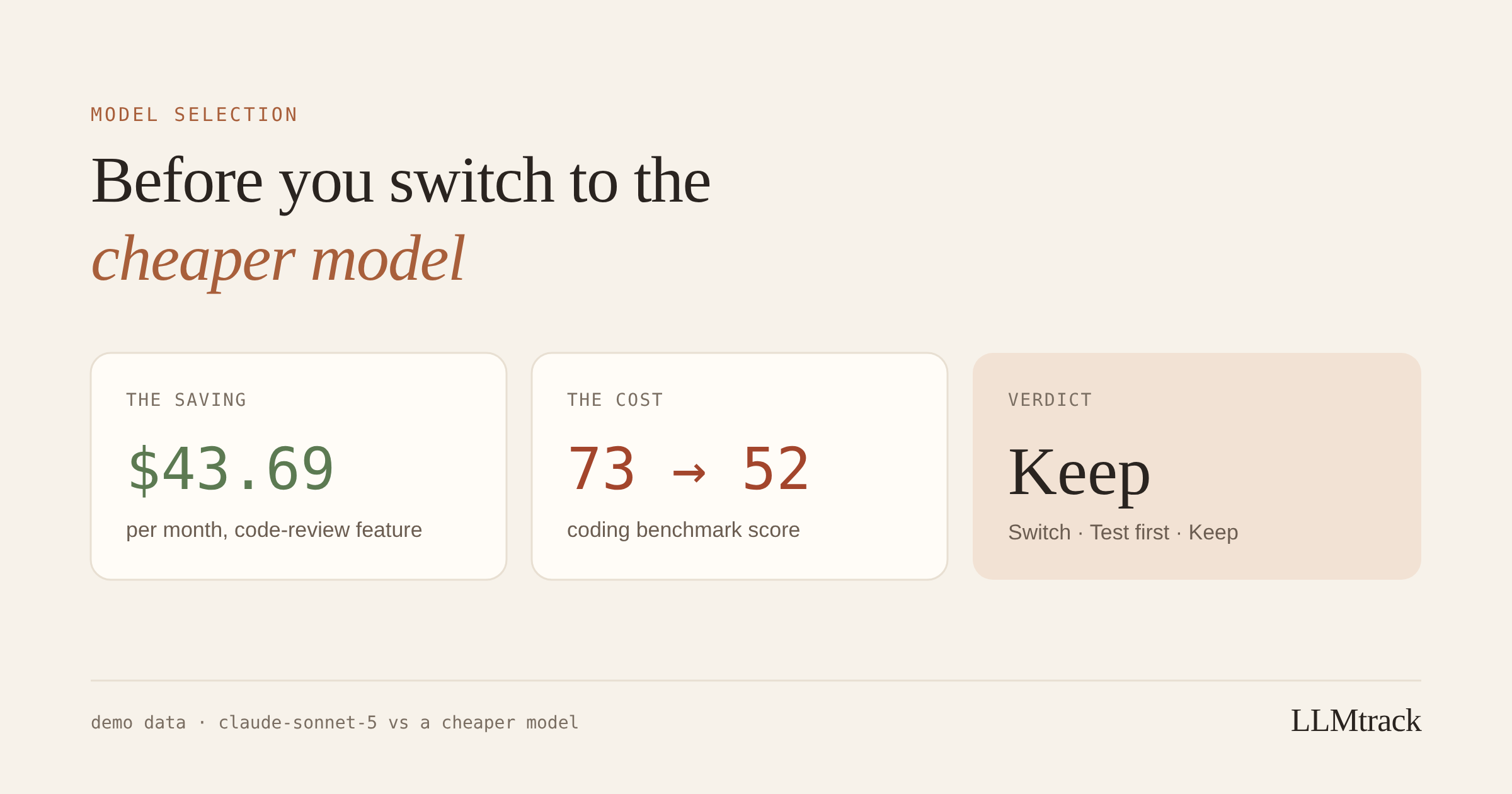
Here's an example from the demo workspace I use for product screenshots, so these aren't a real customer's numbers. A code-review feature runs on Claude Sonnet 5. A cheaper model would save $43.69 a month. On a coding benchmark, the current model scores 73 and the cheaper one 52. That saving costs 21 points on exactly the kind of work the feature does. Saving $44 a month and shipping worse code reviews is a bad trade for almost any product.
Three outcomes, and when each applies
- Switch when the saving is real and the quality gap for that kind of work is small. Classification, routing, short summaries and simple extraction tend to be the safest candidates.
- Test first when the gap is close enough that a benchmark can't decide it for you.
- Keep when the quality you'd lose is worth more than the money you'd save. Coding, long-document reasoning and anything customer-facing where mistakes are visible deserve the most caution.
A useful check for the Keep case: work out what one unhappy customer costs you, in lost subscription revenue and support time. Put that next to the monthly saving. In the code-review example above, it isn't close.
How to test a cheaper model on a slice of traffic
Benchmarks aren't your workload. Your feature has its own prompts, users and idea of what good output looks like. When the numbers are close, test on real traffic:
- Send a small share of the feature's requests, say 5 to 10%, to the cheaper model. Pick requests at random, not by user type, so the two groups are comparable.
- Track the test as its own feature, for example
code-reviewandcode-review-test, so cost per request for each sits side by side. - Compare outcomes your users can feel: complaints, retries, how often people edit or regenerate the output, thumbs down if you collect them.
- Run it for at least a normal week, so you see weekday and weekend usage before deciding.
- Keep the switch reversible. Put the model name in config, not in code, so rolling back takes one change.
If neither model wins outright, there's a middle path: route easy requests to the cheaper model and send hard ones to the expensive one. That's more work to build, but it often keeps most of the saving and most of the quality.
Where LLMtrack fits, and where it stops
This decision is what LLMtrack's Model Intelligence was built for. For each feature, it works out the saving from your real usage, checks the cheaper options against independent benchmarks for that kind of work (using data from Artificial Analysis and OpenRouter), and gives one of three verdicts: Switch, Test first or Keep. A Keep card shows the saving you'd pass up next to the score you'd lose.
I went back and forth on that Keep verdict. A tool that always finds a saving is easier to sell. But advice that pushes every feature to the cheapest model is advice I wouldn't follow myself.
What it can't do is run your actual prompts through the cheaper model. LLMtrack never sees your prompts, because the SDK only sends token counts and labels. That's why "Test first" exists. Tagging your test slice as its own feature handles the cost side of the comparison. The quality side stays with you and your users.
To see the verdicts for your own features, start on the free plan, no card needed.
Related reading: why defaulting to a flagship model is a 30x mistake and the cheapest LLM APIs compared, and why the ranking flips.
FAQ
Within one provider, the gap can be 10 to 20 times per token. On Anthropic's published pricing (checked 28 Oct 2026), Claude Haiku 5.5 is 20 times cheaper than Claude Sonnet 5 for prompts up to 100,000 tokens. The real saving for your feature depends on its mix of input, output and other token types.
Compare the two on the benchmark category that matches your feature's work, then test the cheaper one on 5 to 10% of real traffic for at least a week. Watch complaints, retries and how often users edit or regenerate the output.
No. They tell you where a model is weaker, not how it handles your prompts. Use them to decide whether to switch, test or keep, and use a traffic test when the gap is close.
Cost per request for each model, tracked as separate features, plus outcomes users feel: complaints, retries, edits, regenerations and ratings. Compare cost per successful result, not just cost per request.
When the quality gap is large on the work the feature does, and when mistakes are visible to customers. If one lost customer costs more than the monthly saving, keep the model.
Sources
Checked on 28 and 29 Oct 2026:
See Switch, Test first or Keep for your own features
Free plan, no card.
Start tracking free →