LLM Proxy or SDK? Where Your AI Cost Tracking Should Sit
A proxy sees every LLM call and can block one at a budget. Tracking after the response can't slow or break a request. Here's what each costs you, and how to make the SDK route miss nothing.
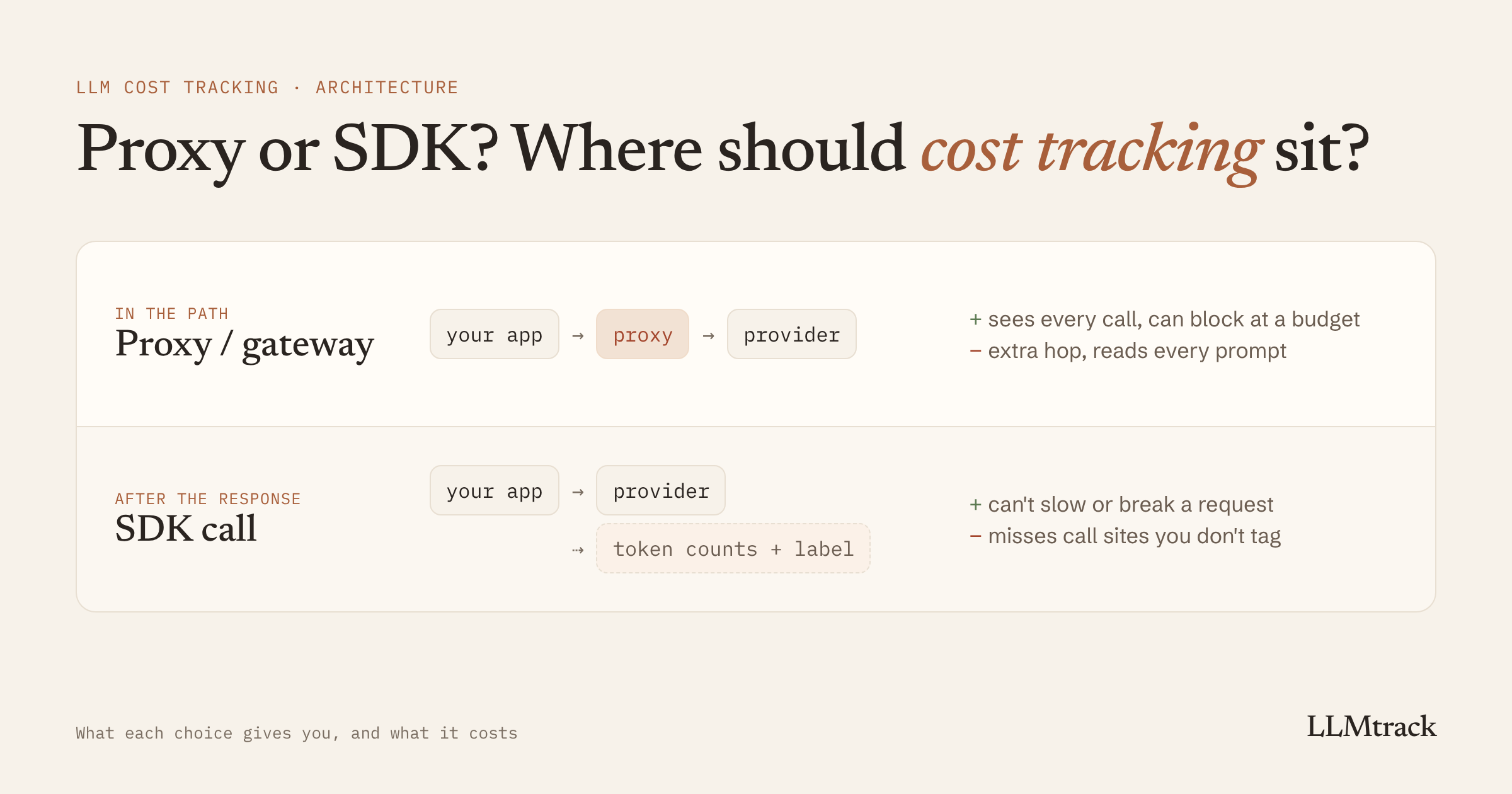
If you're setting up cost tracking for your AI features, one decision comes before every other: does the tracking sit in the path of your requests, or does it run after them? A proxy sits in the middle of every call between your app and the provider. An SDK call after the response stays out of the way. Each gives you something the other can't, and the choice decides what breaks when something goes wrong.
When I started building LLMtrack, I couldn't have told you the difference between a proxy and a gateway. I learned both words around the same time I chose not to build either, so read this as a recent learner's notes, with the trade-offs I've lived with since. My original plan had a proxy mode. I parked it, and the reasons are below.
Tracking is the "Measure" part of the complete guide to LLM cost optimization. This post covers where that measurement should live.
The two places tracking can live
In the path. Your app sends requests to a proxy instead of the provider, usually by changing the base URL and API key. The proxy forwards each request, gets the response, logs it and passes it back. Hosted gateways and self-hosted proxies both work this way.
After the response. Your app calls the provider directly, as it does now. Once the response is back, your code sends the token counts from the response's usage object, plus a label like the feature name, to wherever you track costs. That can be your own database or a tracking service.
Side by side:
| Proxy or gateway in the path | Tracking after the response | |
|---|---|---|
| Sees every call | Yes, if all traffic goes through it | Only the call sites you instrument |
| Can block a request at a budget | Yes | No. It can alert and forecast |
| Caching, fallbacks, routing | Yes | No |
| Effect on your users' requests | Adds a network hop | None, it runs after the response |
| If it goes down | Your AI feature goes down, unless you fail over to the provider | You lose tracking data. Users aren't affected |
| Sees prompts and responses | Yes, by design. Some let you turn logging off | Only what you send. Token counts are enough for cost |
| Setup | Change the base URL and keys | One call per call site, or one shared wrapper |
What a proxy gives you
A proxy sees everything that passes through it. Nobody has to remember to add tracking when a new feature ships, as long as the feature uses the proxy's URL.
It can also act while the request is happening, which nothing after the response can do. The clearest example is a hard budget. In LiteLLM's proxy, for instance, you can give a virtual key a max_budget, and once the key's spend crosses it, requests through that key fail. You can reset it on a schedule with budget_duration. LiteLLM's docs also note that these budgets are enforced against spend stored in its database, so they need one. The same layer can cache repeated requests and retry against a second provider when the first is down. How to choose an AI gateway for multiple LLM providers compares the main options on those features.
What a proxy costs you
It's in the path. Every request takes an extra hop. How much that adds depends on where the proxy runs relative to your app and the provider, so measure it on your own traffic rather than trusting a number from a landing page. If the proxy has an outage, so does your AI feature, unless your code can fall back to calling the provider directly.
It sees every prompt and response. That can include customer documents, personal data and your own code. If the proxy is hosted by someone else, that's a lot of trust to extend for a cost number, and your customers may have a say in it. Check two things before you route traffic through one: how long it keeps request and response bodies, and whether you can turn that logging off. LiteLLM, for example, has a turn_off_message_logging setting that keeps prompt text inside your proxy.
It's one more thing to run or pay for. A self-hosted proxy needs hosting, upgrades and monitoring. A hosted one has its own pricing and limits.
What tracking after the response costs you
It can't stop a request. It hears about a call after it has happened. What it can do is tell you fast: the cost of each request within a second or so, an alert, and a forecast of the day you'll cross your budget. That's an early warning, and the call still goes out. If you need a hard stop without a proxy, provider spend limits do that job, and when your AI bill will cross your budget covers how OpenAI's and Anthropic's limits behave when you hit them.
It only sees what you instrument. Add a new AI feature, forget the tracking line, and that feature doesn't exist as far as your cost data is concerned.
It needs care in serverless functions. A background call that isn't awaited can be cut off when the function returns its response. That's the easiest way to lose tracking data without noticing.
The last two have practical fixes.
How to make tracking after the response miss nothing
1. Route every call through one wrapper
Instead of adding tracking at each call site, give your app one function that calls the model and records the usage. Then a new feature only has to pick a label.
// llm.js: the only place your app calls the model
import OpenAI from 'openai';
const openai = new OpenAI();
export async function complete({ feature, customerId, ...params }) {
const completion = await openai.chat.completions.create(params);
// Don't await: the user's response never waits on tracking.
recordUsage({
feature,
customerId,
model: completion.model,
usage: completion.usage,
}).catch((err) => console.error('usage tracking failed', err));
return completion;
}recordUsage is whatever stores the numbers: an insert into your own table, or a call to a tracking service. Give every call site its own feature label. If everything is called chat, your breakdown is one bar.
2. Keep tracking off the hot path, and never let it throw
The tracking call should never make a user wait or turn a successful response into an error. Don't await it in the request handler, catch its errors, and log them somewhere you'll see them. Swallowing errors silently is how a broken API key goes unnoticed for a month.
3. Retry with an idempotency key
Tracking requests fail sometimes, so retry them on network errors, timeouts and 5xx responses. But give each event a unique ID and send the same ID on every retry, so the receiving side can drop duplicates. Without that, a retry after a timeout can record the same request twice, and your cost data comes out high. The same double-counting problem hits LLM calls themselves, covered in how retry logic inflates your LLM bill.
4. In serverless, hand the work to the platform
On Vercel, work that isn't awaited can be cut off when the function finishes. In Next.js 15.1 and later, Vercel recommends after() from next/server, which runs a callback once the response is sent. Outside Next.js, waitUntil() from @vercel/functions extends the function's lifetime until a promise settles. Either way, the work shares the function's timeout, so keep it short.
// app/api/summarize/route.js (Next.js 15.1+)
import { after } from 'next/server';
import { openai } from '@/lib/openai';
import { recordUsage } from '@/lib/usage';
export async function POST(request) {
const { text, customerId } = await request.json();
const completion = await openai.chat.completions.create({
model: 'gpt-5.6-luna',
messages: [{ role: 'user', content: `Summarize:\n\n${text}` }],
});
// Runs after the response is sent, and isn't cut off when the handler returns.
after(() =>
recordUsage({
feature: 'summarize',
customerId,
model: completion.model,
usage: completion.usage,
}),
);
return Response.json({ summary: completion.choices[0].message.content });
}Other serverless platforms have their own equivalent. Check yours before assuming background work survives.
5. Reconcile against the provider once a month
Compare your tracked total for last month with the total on each provider's own usage dashboard. A small gap is normal, from rounding and from requests in flight at the month boundary. A large one means something isn't tracked: a call site that bypasses the wrapper, a script, a background job. Find it by comparing per model first, because an untracked feature usually uses one model.
Already running a gateway?
Then you don't need a second thing in the path, and you may not need to change your code at all. Many gateways can export a trace of each request to another service, often in the OpenTelemetry format. Point that export at your cost tracking and you get per-request costs without touching your app. Turn off prompt logging on the export if you can, since cost only needs token counts and labels.
The catch is labels. A gateway knows the model and the API key. It doesn't know which feature or customer a request was for unless you send that along, usually in a header or a metadata field the gateway passes through. Check how your gateway does it before relying on a per-feature breakdown.
Questions that decide it
- Do you need a hard stop at a budget, or is a same-day warning enough? A hard stop needs a proxy or a provider spend limit.
- Would you, and your customers, accept a third party reading every prompt? If not, keep prompts out of the tracking path.
- Do you need caching or failover anyway? Then you're running a gateway already, and cost tracking should read from it.
- Who will remember to add tracking when the next feature ships? If nobody, use a wrapper, and reconcile monthly.
Where LLMtrack sits, and what it doesn't do
LLMtrack tracks after the response. Your app calls the provider as usual, then one call sends the token counts and labels:
llmtrack.track({
provider: 'openai',
model: completion.model,
feature: 'summarize',
...fromOpenAIUsage(completion.usage),
});track() doesn't block and doesn't throw. Failed deliveries retry on network errors, timeouts and 5xx responses with a stable idempotency key, so a retry can't record a cost twice. Prompts never leave your servers. Cost is worked out on LLMtrack's side from each provider's published schedule, so a price change doesn't need a deploy from you. Details are in the SDK reference.
If you already run OpenRouter, Cloudflare AI Gateway or LiteLLM, LLMtrack can read their trace exports instead, so there's no SDK to add. The integrations page has the setup for each.
The trade-offs above apply to LLMtrack as much as anyone. It can't block a request. It forecasts the day you'll cross your budget, but the call still goes out. And it only sees what you track or export to it.
To try it on your own traffic, start on the free plan, no card needed. For a wider look at the tools in this space, see LLM cost tracking tools compared.
FAQ
No. The response from OpenAI, Anthropic and most other providers includes a usage object with token counts. You can record those after each call and price them yourself or with a tracking service. A proxy is only required if you want something to act on requests as they happen, like blocking them at a budget.
It adds a network hop to every request. How much depends on where the proxy runs relative to your app and the provider, so measure it on your own traffic. Tracking after the response adds nothing to the request, because it runs once the response is back.
Yes, with provider spend limits. OpenAI lets you set hard spend limits for an organization or a project, and Anthropic applies a monthly spend cap to organizations on its standard usage tiers, which you can set lower yourself. Once a limit is reached, requests fail until it's raised or reset. Tracking after the response can warn you before that day comes.
Send every model call through one shared function that records usage, give each call site its own feature label, and once a month compare your tracked total with each provider's usage dashboard. A large gap means a call site is bypassing the wrapper.
Cost tracking doesn't need prompts. Token counts, the model name and a label are enough to price a request. If a proxy or gateway sits in your path, check how long it keeps request and response bodies and whether you can turn that logging off.
Yes, but you don't usually need both for the same traffic. If your requests already go through a gateway, export its traces to your cost tracking. Use SDK tracking for calls that go to providers directly.
Sources
Checked on 2 Nov 2026:
Track cost per feature without a proxy
Free plan, no card. One line after each AI call.
Start tracking free →